Notes OS 27: design-forward Android notes with sketching and privacy
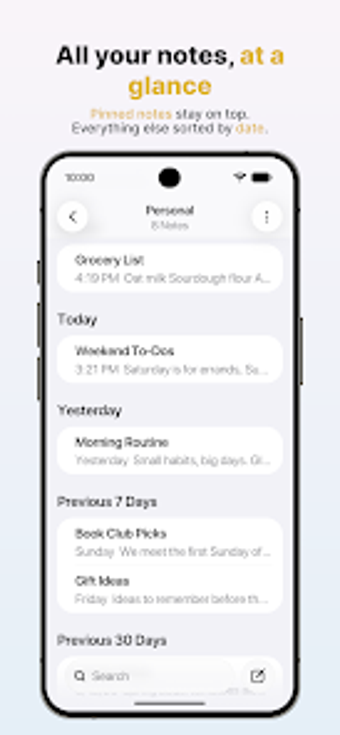
Capture text, checklists, sketches and audio inside a single note space, with a visual gallery and pinned-folder organization that supports daily and professional workflows. Notes OS 27, from GriceMobile, targets Android productivity users who want an aesthetic, iOS-inspired layout and local-first storage. Key functions include rich text styling, biometric locking, and Google Drive sync for cross-device access. The app suits solo contributors and small teams that need multimedia notes and private storage without mandatory sign-in.
It combines note types into one workspace
Notes OS 27 consolidates text, sketches, and audio into the same entry, so a meeting note can include a recorded memo, attached photo, and a hand-drawn diagram. The app offers Title, Heading, and Body styles, checklists, tables, and five highlight colors, which support producing deliverables such as annotated meeting minutes or quick project sketches without switching apps.
Organization maps to real workflows
The app arranges content by date with folders, subfolders, and pinned notes, letting you keep project folders at the top for rapid access. Search highlights matches across all notes and provides quick filters for attachments or locked items, which helps when you need to retrieve an audio file or locked contract excerpt from a large note set.
Privacy and offline-first operation match sensitive use
Local-first storage and optional Google Drive synchronization keep data in a private app folder while avoiding third-party servers. Notes can be individually locked with a 6-digit passcode, pattern, or biometric authentication; locked notes also hide previews in the main list. Full offline functionality and no required sign-in support work on the go or in restricted networks.
Creative and multimedia tools extend note outcomes
The integrated sketching suite includes pen, fineliner, marker, pencil, eraser, line width and opacity controls, plus shapes, stickers, and signature capture. Audio recording directly into notes and photo attachments from camera or gallery let you produce proof-of-work artifacts and visual reports from a mobile device, while the gallery view presents visual notes for quick scanning.
Who should adopt Notes OS 27 and when it may not fit
Notes OS 27 serves Android professionals who need mixed media notes and strict local privacy controls; its design cues and sketching tools suit creative consultants, field technicians, and solo professionals. The app is a newer entry with a design-first approach, so teams requiring extensive enterprise integrations or centralized account management may find its local-first model limiting. For individuals seeking multimedia, private notes, it performs well.